
 Compliance & Credentialing
Wound Care LCD Compliance — Automated, Not Manual.
License expirations sneak up on teams that track credentials in spreadsheets. Medipyxis automates credentialing workflows — from 90-day renewal alerts to scheduling blocks on expired credentials — so your compliance team spends less time manually checking and more time on exceptions.
90/60/30
Day renewal alerts
Auto
Scheduling block
Instant
Audit reports
90 Days
First alert: Clinician and supervisor notified. Renewal window is open.
60 Days
Second alert: Escalated reminder with direct link to renewal upload.
30 Days
Final alert: Scheduling manager notified. Contingency planning starts.
Day 0
Auto-block applied. Clinician removed from schedulable pool until renewal is uploaded.
90/60/30
Days
License renewal alerts before expiry
Auto
Scheduling Block
Applied on expired credentials
Instant
Audit Report
Compliance history on demand
90/60/30-Day Alerts — Renewals Never Sneak Up Again
Every credential expiration is tracked automatically. Medipyxis sends staged alerts at 90, 60, and 30 days before a license or certification expires — giving clinicians and administrators ample time to renew before any disruption occurs.
- ✓All license types tracked — RN, NP, PT, OT, MD, and specialty certifications
- ✓Staged alerts at 90, 60, and 30 days before expiry
- ✓Alerts sent to the clinician and their supervisor
- ✓Renewal upload workflow built into the alert
- ✓Dashboard showing all upcoming expirations across your team
How Auto-Block Works
- 1Credential expiry date is tracked in the system
- 2On the expiry date, scheduling access is removed
- 3Existing scheduled visits trigger coordinator alert
- 4Clinician uploads renewal documentation
- 5Admin verifies and approves the renewal
- 6Scheduling access restored automatically
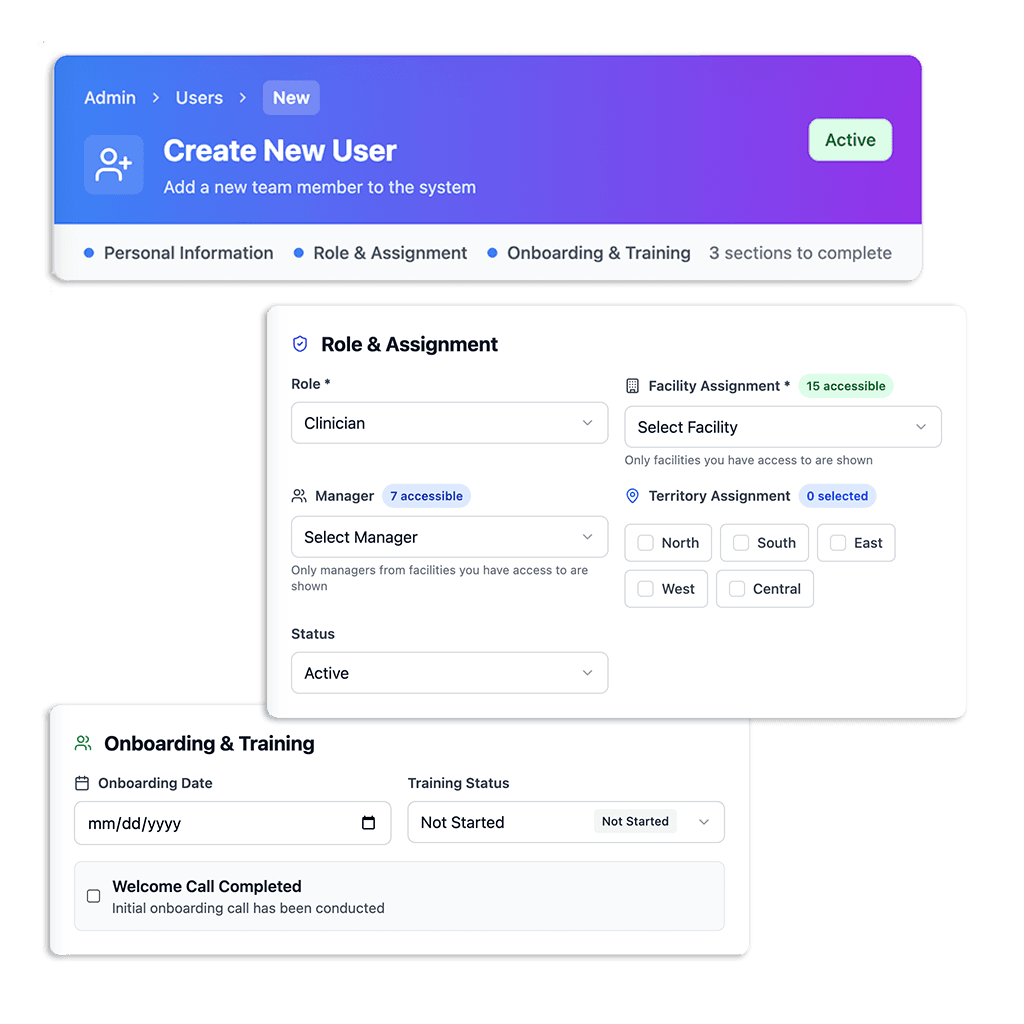
3-Step Onboarding Wizard — New Clinicians Up in Minutes
The Create New User wizard guides administrators through a structured onboarding flow — role assignment, credential upload, and access provisioning — all in one workflow. New clinicians cannot access patient records until every required item is complete.
Role-Based Checklists
Credential uploads, background checks, HIPAA training — all assigned automatically based on role.
Patient Access Gated
New clinicians cannot be scheduled until all onboarding items are marked complete.
Policy Sign-Offs
Electronic acknowledgments are stored and timestamped for audit purposes.
Annual Review Workflows
Recurring attestations are scheduled automatically and tracked to completion.
Timestamped Audit Trail — On Demand
Medipyxis maintains a timestamped record of credential uploads, renewals, sign-offs, and scheduling actions. When an auditor asks for compliance documentation, you can generate a history report on demand — no spreadsheet reconstruction.
The report shows credential status at points in time, which helps you demonstrate scheduling decisions during an audit window. Audit outcomes depend on the full scope of your practice’s operations and documentation; Medipyxis is designed to support that work, not to substitute for it.
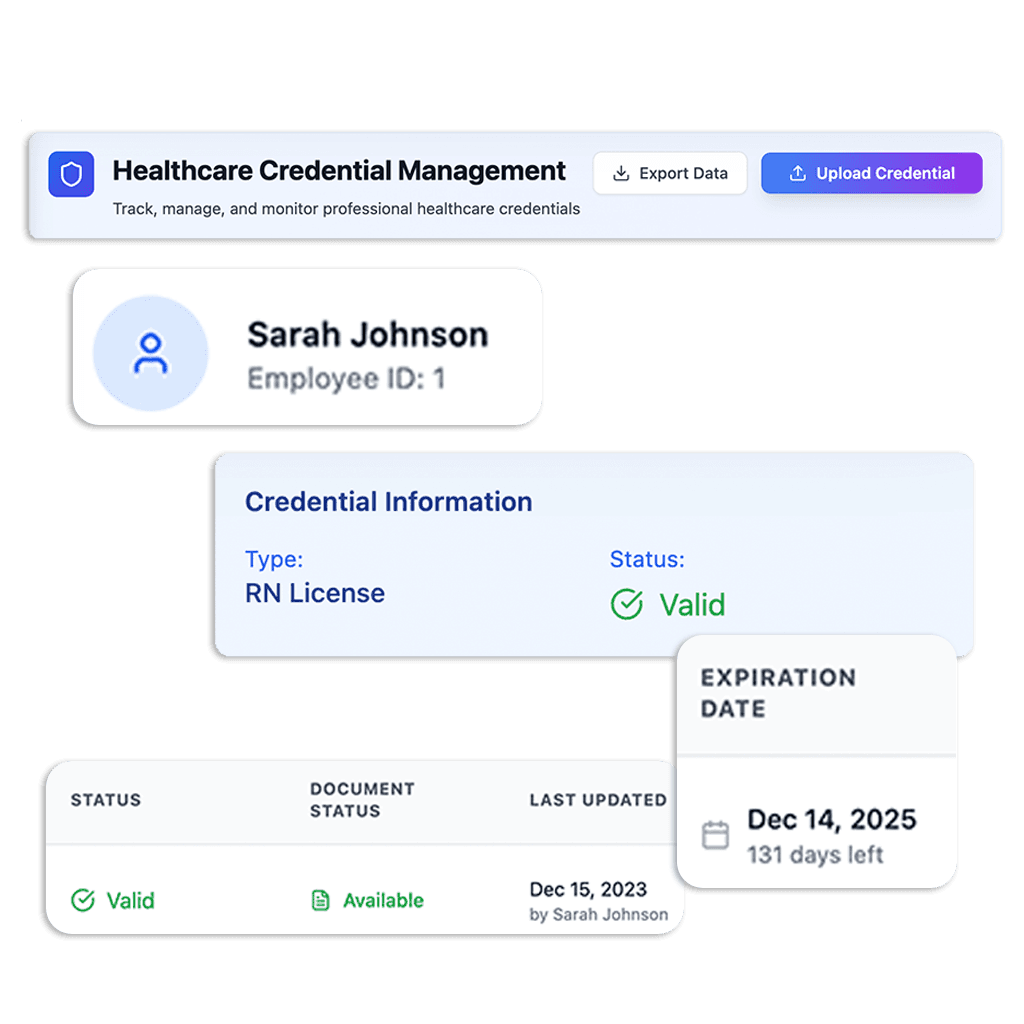
Always-On Credential Tracking
Every license, certification, and required document is tracked with its expiration date and current status. Medipyxis sends auto-alerts before credentials expire and applies scheduling blocks when they do — designed to reduce the chance of a compliance gap reaching a patient visit.
- ✓All credential types tracked — licenses, certifications, background checks, training records
- ✓Document status visible at a glance — current, expiring soon, or expired
- ✓Expiration dates trigger automatic staged alerts to clinician and supervisor
- ✓Auto-alerts at 90, 60, and 30 days ensure ample renewal time
- ✓Scheduling blocks applied automatically on credential expiry — no manual intervention
Compliance Connects to the Rest of the Platform
Compliance & Credentialing — Common Questions
Make Compliance Structural, Not Manual
See how Medipyxis automates credential tracking, renewal alerts, and scheduling blocks in a 15-minute demo.